
DFTW - Mastering Your Computer
Context and the humble beginnings of Hackerman

What is a computer?
Context - the circumstances that form the setting for an event, statement, or idea, and in terms of which it can be fully understood and assessed.
Last post I talked about what makes a thing that thing - this post I’ll take a second to explore the context of which that thing exists. To keep things from entering the metaphysical or abstract too much I’ll try to keep it limited to a concept of a computer.
If I handed you a laptop and said “open it up and write something” which synapses in your brain do you think would fire off first? Would you look for a brand name some where? Would you just know how to open it up and use a keyboard? It would probably be a whole different thought process if I handed you a notebook and pencil and asked you to do the same thing right? - Basically, that’s context.
In the context of a computer “writing something” leads you to typing on the keyboard whereas the notebook should lead you to grabbing the pencil. Techincally you are doing the same thing just in two different contexts each with its own set of actions.
Throughout this module I went through some thought exercises that made me really explore levels of understanding (or stages of discovery). I may find myself at a certain level of “understanding” of a computer - there are connections in my brain that already exist to help me explore and discover new items. However someone who has no concept of what a computer even is would have a completely different level of “understanding”.
Now you might say “everyone knows what a computer is these days!” - and yes I do think more and more people may be aware of the concept of a computer, their frame of reference (context) of that concept varies vastly. I mean whens the last time someone in your family asked you how to do something on the computer that was incredibly easy for you to figure out?
DFTW so far
Enter Hackerman
A big chunk of this module was also about becoming a mac power user - by exploring shortcuts and keyboard combinations to move around sans clicking!
Now I’ll be honest, at first I thought, “oh yeah I got this, I’ve been using my mac for 3 years!” - turns out I in fact, did not have this. 3 years on a mac and I have yet to use virtual spaces or command + tab to switch between things (efficiency!).
I was glad also, that the good old terminal was brought up in one of the modules! When I was searching for laptops for school, I had found myself in a sort of Linux fanboy phase (might go more in detail about that in a later post) and was all in on terminal usage. macOS having both a terminal and file structure that was similar enough to my trusty popOS was a huge deciding factor for me.
I will also have you know that I passed my Linux Essentials exam and am super officially certified in the ways of the unix-based terminal! - Jokes aside all I mean to say is that at some point I drilled a bunch of basic terminal commands into my brain that are just constantly itching to be used.
So yeah I’m basically a certified Hackerman now.
Whats this gotta do with design?
It may seem like I just like talking about random stuff in these post, from concepts to macOS - but thats what design is!… I think!
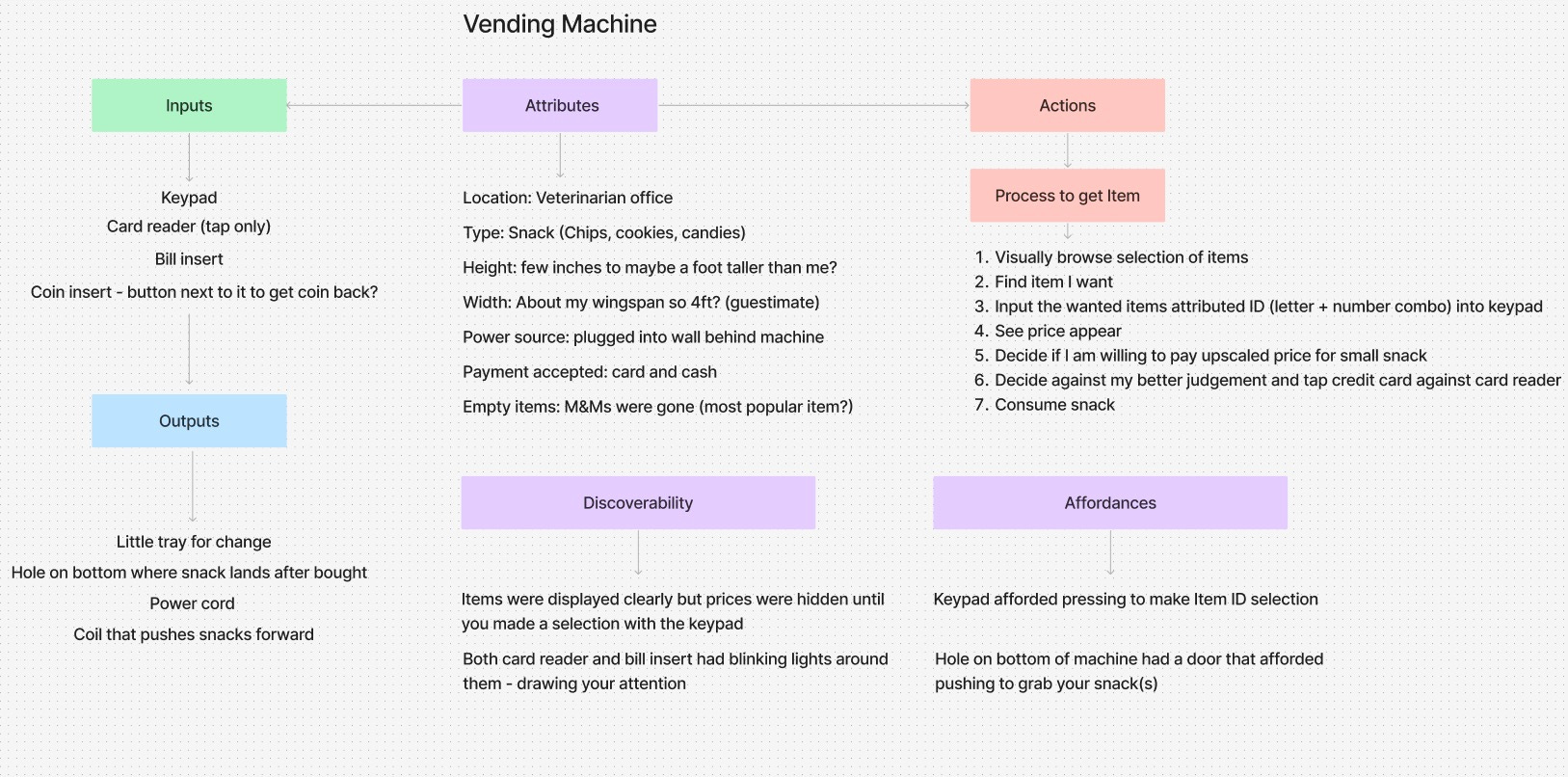
Discoverability - The degree to which something can be found
Affordance - The relationship between the object and the user that provides the opportunity for action
In my case, I zoomed ahead trying to build websites without once asking the question: what is a website? Or better yet what is it in the context of someone coming to explore this particular website - How discoverable are things on this site for them? What sort of things will the site afford the user?
I made this little diagram of a vending machine that might make discoverabilty and affordance make more sense (bottom right).
All this to say - Foundations! They’re important homie.
Progress I’ve made:
Learned how to close windows with my keyboard! (command + w)
Created a visual design inspiration folder - then created an alias folder for that folder
Thought about how “things” are made from a design level
Set up Google Drive on my desktop
Got over my anti Chrome stubbornness and downloaded Google Chrome
Discovered I’m not actually great at using Google Docs just yet lol
Music!
See ya next time - Ernesto
Excellent! I love seeing how the HCI concepts we’ve been front-loading with this round of students are already coming through in your work. I think this is going to have a really positive long-term effect. Keep up the good work!!